The FIRE Calculator explainedDer FIRE-Rechner erklärt
The FIRE Calculator: Lean, Regular, Fat, and Coast variants in one screen, with a projection chart and every assumption you can tweak.Der FIRE-Rechner: Lean-, Regular-, Fat- und Coast-Varianten auf einem Bildschirm, mit einem Prognosediagramm und jeder Annahme, die Sie feinjustieren können.
Quick start
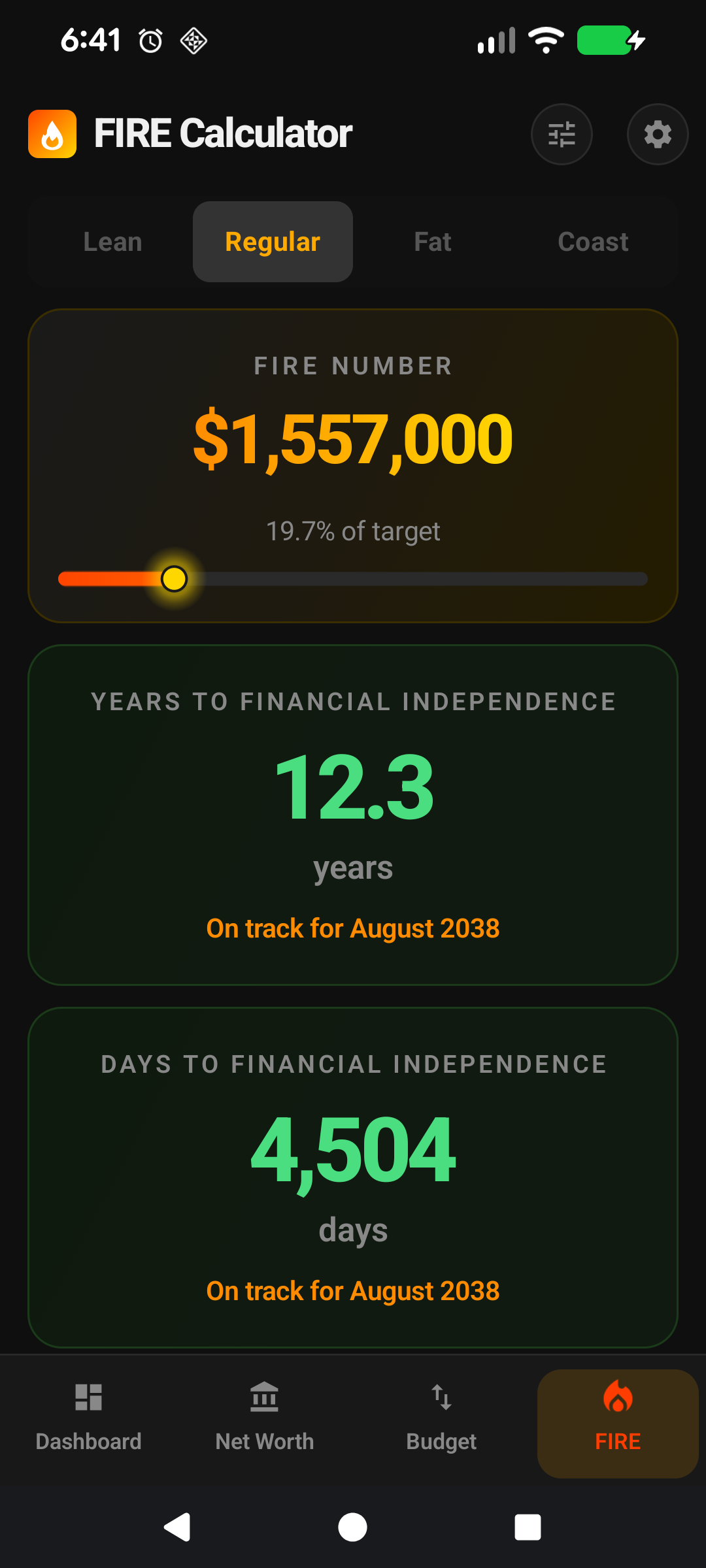
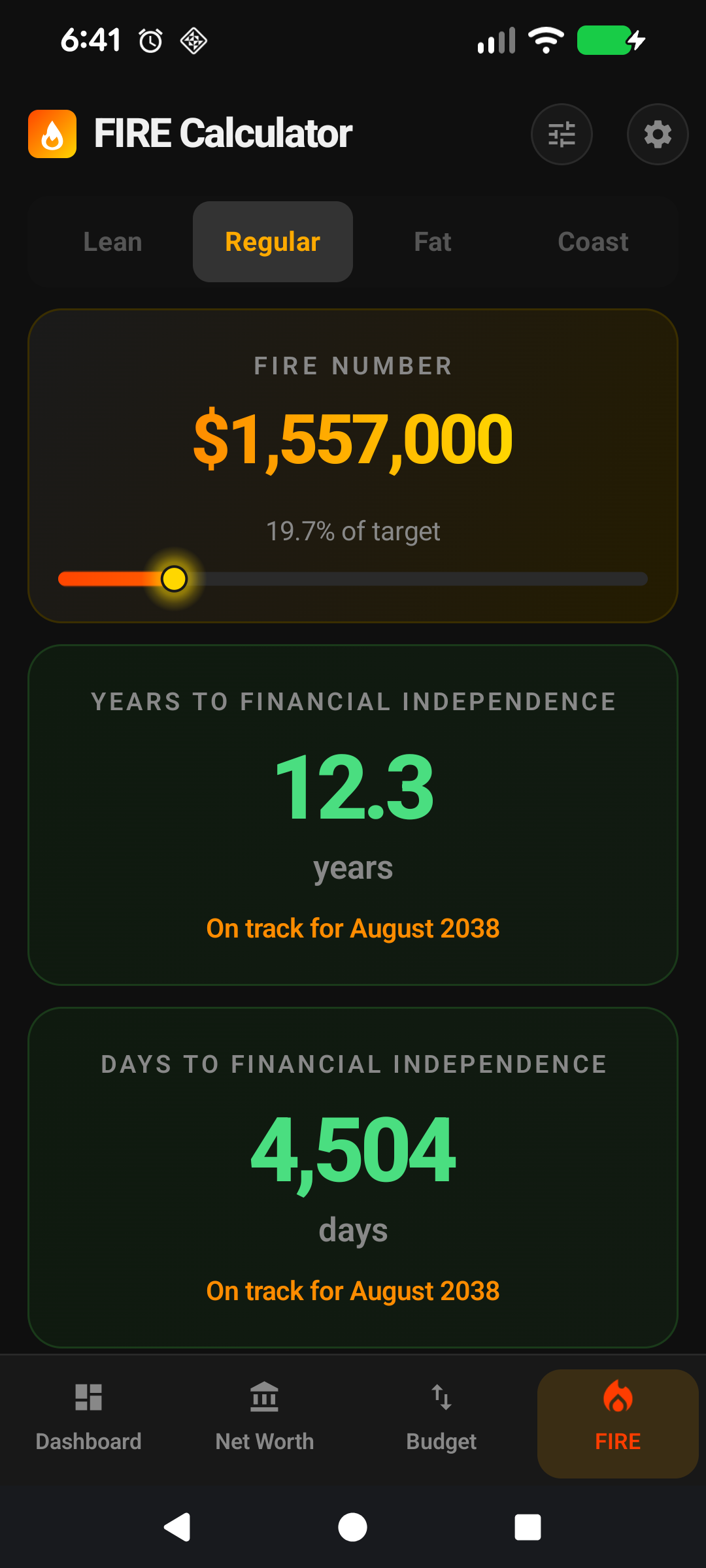
The FIRE screen is where your entire financial picture turns into a concrete target: how much you need, how close you are, and how long it'll take.
Four tabs at the top switch between the four FIRE variants: Lean, Regular, Fat, and Coast. Each represents a different definition of "enough".
The big number on each tab is your FIRE number for that variant — the portfolio size you need to retire.
The progress bar below shows how far you've come; the years to FI figure projects forward based on your current savings rate.
The projection chart plots your portfolio's growth from today until it hits your target, assuming the return + contribution figures you've entered.
Change the assumptions via the icon at the top of the screen — return rate, inflation, tax, withdrawal rate.
The rest of this guide is for users who want to tune the screen. If you're happy with the defaults, you can stop here — everything below is optional customisation.
Going deeper
The 25× rule
All four FIRE variants derive from the same core idea: the portfolio size that can sustainably fund your annual spending forever is roughly 25× your annual expenses (the inverse of the 4% safe-withdrawal rate from the Trinity Study). FirePath's default withdrawal rate is 4% — adjust in Settings if you prefer a more conservative 3.5% (which corresponds to roughly 28× spending).
Expenses come from your Income & Expenses screen, normalised to annual. The calculator multiplies by 25 (or your chosen multiplier) to land on your FIRE number.
Lean vs Regular vs Fat
Regular FIRE uses all your expenses: the spending level you currently enjoy, sustained indefinitely.
Lean FIRE uses only expenses you've flagged Include in Lean FIRE. The idea: you could cut back to just essentials (rent, food, insurance, basic transport) and still be free. Lean's FIRE number is usually 40-60% of Regular's.
Fat FIRE is Regular times a multiplier — default 1.5×, configurable in Settings. The idea: retire with significant headroom for travel, upgrades, generosity. Fat is for people who want a safety margin beyond the 25× baseline.
Coast FIRE: the most useful milestone
① Coast target. ② "You can stop saving at age" callout.
Coast FIRE is the point at which your existing investments will grow to a full FIRE target by your retirement age with zero further contributions. In other words: you've saved enough that you can stop contributing and just let compounding carry you home.
Mathematically it's the present value of your target at your retirement age, discounted at your expected real return. Example: Regular FIRE number $1.5M, retirement age 60, you're 35, real return 5%. Coast FIRE = $1.5M / (1.05 ^ 25) = ~$443k. Hit $443k invested and you can "coast" to $1.5M by 60.
Psychologically it's the biggest milestone most FIRE-chasers hit. Many people reach Coast FIRE in their 30s, then optionally reduce hours, switch to meaningful work, or keep saving to reach full FIRE earlier.
The Coast tab shows your progress to the Coast number. When you cross it, the tab reveals the "you can stop contributing" message — a celebratory moment many users screenshot.
Years to FI
The "years to FI" figure under each variant is a projection: how long until your current Investment NW plus your current savings rate compound up to the target. Uses your real-return assumption and subtracts projected inflation so the number is in today's dollars.
It's a single-point estimate, not a probability distribution — markets don't deliver the average every year. But it's a useful directional signal: cutting 4 years off your FI date by increasing savings by $200/month is a concrete motivator.
The projection chart
① Portfolio growth curve. ② FIRE target line. ③ Years-to-FI at crossover point.
Plots two series: your portfolio's projected growth from today to your FIRE target (solid line), and your FIRE target (horizontal dashed line). The point where the lines cross is your projected FI date.
The chart respects the FIRE uses Total NW toggle — flip it on if you want the projection to include your entire net worth rather than just investment-flagged assets.
FIRE uses Total NW: when to flip it on
Default is off (Investment NW only) because for most users, the primary residence and car aren't funding retirement. But some users plan to downsize, sell the house, or liquidate other personal-use assets as part of their retirement plan. If that's you, flip the setting on and the projection runs against your full net worth.
You can flip it back and forth to see both projections — the only thing that changes is which column from your snapshots is fed into the maths.
Make it yours — Settings that affect this screen
Default FIRE Type — Settings → Display. Which variant loads when you open the screen.
Show Assumptions on FIRE — Settings → Display. Keeps a summary of your return/inflation/tax assumptions visible at the top of the screen for reality-check at-a-glance.
Show FIRE Numbers on Coast — Settings → Display. Toggles the numeric reveal on the Coast tab (some users find it motivating, others find it distracting).
FIRE uses Total Net Worth — Settings → Display. Flip to run the projection against Total NW instead of Investment NW. Off by default because Investment NW is what actually funds retirement.
FIRE Assumptions — Settings → FIRE. The full set of knobs: expected real return, inflation, effective tax rate, safe-withdrawal rate, retirement age for Coast FIRE.
Lean FIRE Included Expenses — per-expense toggle on the Add/Edit Expense screen. Controls which expenses count toward the Lean variant's target.
Schnellstart
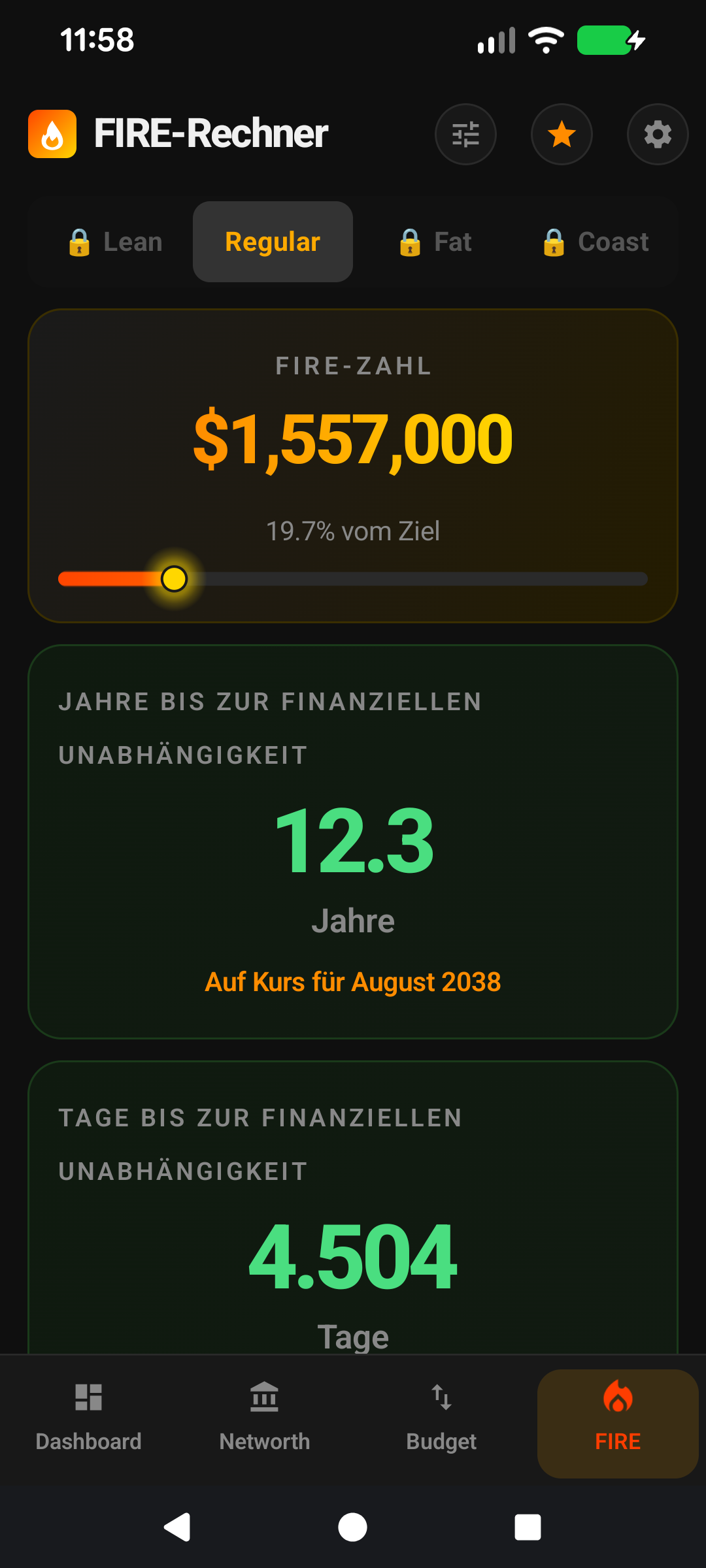
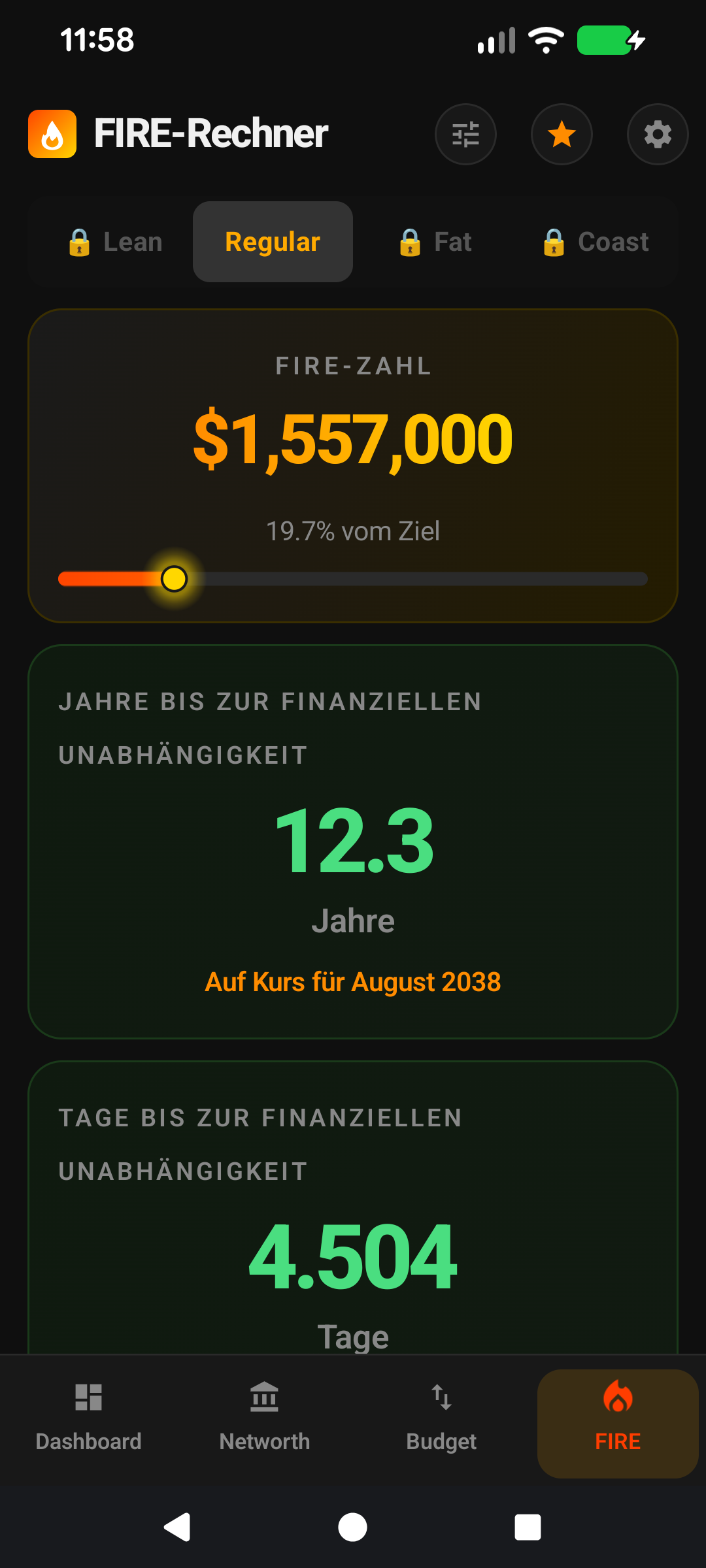
Der FIRE-Bildschirm ist der Ort, an dem sich Ihr gesamtes Finanzbild in ein konkretes Ziel verwandelt: wie viel Sie brauchen, wie nah Sie dran sind und wie lange es dauern wird.
Vier Tabs oben wechseln zwischen den vier FIRE-Varianten: Lean, Regular, Fat und Coast. Jede repräsentiert eine andere Definition von "genug".
Die große Zahl auf jedem Tab ist Ihre FIRE-Zahl für diese Variante — die Portfoliogröße, die Sie zum Ruhestand brauchen.
Der Fortschrittsbalken darunter zeigt, wie weit Sie gekommen sind; die Zahl Jahre bis FI prognostiziert voraus, basierend auf Ihrer aktuellen Sparquote.
Das Prognosediagramm zeichnet das Wachstum Ihres Portfolios von heute an, bis es Ihr Ziel erreicht, unter Annahme der Rendite- und Sparzahlen, die Sie eingegeben haben.
Ändern Sie die Annahmen über das Symbol oben auf dem Bildschirm — Renditerate, Inflation, Steuer, Entnahmerate.
Der Rest dieser Anleitung ist für Nutzer, die den Bildschirm anpassen möchten. Wenn Sie mit den Standardeinstellungen zufrieden sind, können Sie hier aufhören — alles unten ist optionale Anpassung.
Tiefer eintauchen
Die 25×-Regel
Alle vier FIRE-Varianten leiten sich von derselben Kernidee ab: Die Portfoliogröße, die Ihre jährlichen Ausgaben dauerhaft nachhaltig finanzieren kann, liegt ungefähr beim 25-Fachen Ihrer jährlichen Ausgaben (der Kehrwert der 4%-Entnahmerate aus der Trinity-Studie). FirePaths Standard-Entnahmerate ist 4 % — passen Sie sie in den Einstellungen an, wenn Sie konservativere 3,5 % bevorzugen (was ungefähr dem 28-Fachen der Ausgaben entspricht).
Ausgaben stammen von Ihrem Einnahmen-&-Ausgaben-Bildschirm, normalisiert auf Jahreswerte. Der Rechner multipliziert mit 25 (oder Ihrem gewählten Multiplikator), um bei Ihrer FIRE-Zahl zu landen.
Lean vs. Regular vs. Fat
Regular FIRE verwendet alle Ihre Ausgaben: das Ausgabenniveau, das Sie derzeit genießen, auf unbestimmte Zeit gehalten.
Lean FIRE verwendet nur Ausgaben, die Sie mit In Lean FIRE einbeziehen markiert haben. Die Idee: Sie könnten sich auf das Wesentliche beschränken (Miete, Essen, Versicherung, grundlegender Transport) und wären trotzdem frei. Die FIRE-Zahl für Lean beträgt meist 40-60 % der Regular-Zahl.
Fat FIRE ist Regular mal einem Multiplikator — Standard 1,5-fach, in den Einstellungen konfigurierbar. Die Idee: mit deutlichem Polster für Reisen, Upgrades und Großzügigkeit in Rente gehen. Fat ist für Menschen, die einen Sicherheitsspielraum jenseits der 25-fachen Basis wollen.
Coast FIRE: der nützlichste Meilenstein
① Coast-Ziel. ② "Sie können aufhören zu sparen im Alter von"-Hinweis.
Coast FIRE ist der Punkt, an dem Ihre bestehenden Investitionen bis zu Ihrem Rentenalter ohne weitere Einzahlungen auf ein vollständiges FIRE-Ziel anwachsen werden. Mit anderen Worten: Sie haben genug gespart, dass Sie aufhören können einzuzahlen, und das Zinseszinswachstum bringt Sie ins Ziel.
Mathematisch ist es der Barwert Ihres Ziels zum Rentenalter, diskontiert mit Ihrer erwarteten Realrendite. Beispiel: Regular-FIRE-Zahl 1,5 Mio. $, Rentenalter 60, Sie sind 35, Realrendite 5 %. Coast FIRE = 1,5 Mio. $ / (1,05 ^ 25) = ~443.000 $. Erreichen Sie 443.000 $ investiert, können Sie bis 60 auf 1,5 Mio. $ "coasten".
Psychologisch ist es der größte Meilenstein, den die meisten FIRE-Verfolger erreichen. Viele erreichen Coast FIRE in ihren 30ern und reduzieren dann optional die Arbeitszeit, wechseln zu sinnvoller Arbeit oder sparen weiter, um das volle FIRE früher zu erreichen.
Der Coast-Tab zeigt Ihren Fortschritt zur Coast-Zahl. Wenn Sie sie überschreiten, zeigt der Tab die Nachricht "Sie können aufhören einzuzahlen" — ein feierlicher Moment, den viele Nutzer als Screenshot festhalten.
Jahre bis FI
Die Zahl "Jahre bis FI" unter jeder Variante ist eine Prognose: wie lange es dauert, bis Ihr aktuelles Investment-Nettovermögen plus Ihre aktuelle Sparquote durch Zinseszins zum Ziel anwachsen. Verwendet Ihre Realrendite-Annahme und zieht die prognostizierte Inflation ab, sodass die Zahl in heutigen Dollar ausgedrückt ist.
Es ist eine Punktschätzung, keine Wahrscheinlichkeitsverteilung — Märkte liefern nicht jedes Jahr den Durchschnitt. Aber es ist ein nützlicher Richtungs-Indikator: 4 Jahre von Ihrem FI-Datum abzuziehen, indem Sie das Sparen um 200 $/Monat erhöhen, ist ein konkreter Motivator.
Das Prognosediagramm
① Portfolio-Wachstumskurve. ② FIRE-Ziellinie. ③ Jahre bis FI am Kreuzungspunkt.
Zeichnet zwei Reihen: das prognostizierte Wachstum Ihres Portfolios von heute bis zu Ihrem FIRE-Ziel (durchgezogene Linie) und Ihr FIRE-Ziel (horizontale gestrichelte Linie). Der Punkt, an dem sich die Linien kreuzen, ist Ihr prognostiziertes FI-Datum.
Das Diagramm respektiert den Umschalter FIRE verwendet Gesamt-Nettovermögen — aktivieren Sie ihn, wenn die Prognose Ihr gesamtes Nettovermögen statt nur die mit Investment markierten Vermögenswerte einbeziehen soll.
FIRE verwendet Gesamt-Nettovermögen: wann aktivieren?
Standardmäßig aus (nur Investment-Nettovermögen), weil für die meisten Nutzer der Hauptwohnsitz und das Auto nicht die Rente finanzieren. Aber einige Nutzer planen, zu verkleinern, das Haus zu verkaufen oder andere persönlich genutzte Vermögenswerte als Teil ihres Rentenplans zu liquidieren. Wenn das auf Sie zutrifft, aktivieren Sie die Einstellung, und die Prognose läuft gegen Ihr gesamtes Nettovermögen.
Sie können hin- und herschalten, um beide Prognosen zu sehen — das Einzige, was sich ändert, ist, welche Spalte aus Ihren Momentaufnahmen in die Berechnung einfließt.
Machen Sie es zu Ihrem — Einstellungen, die diesen Bildschirm beeinflussen
Standard-FIRE-Typ — Einstellungen → Anzeige. Welche Variante geladen wird, wenn Sie den Bildschirm öffnen.
Annahmen auf FIRE anzeigen — Einstellungen → Anzeige. Hält eine Zusammenfassung Ihrer Rendite-/Inflations-/Steuerannahmen oben auf dem Bildschirm sichtbar für einen schnellen Realitätscheck.
FIRE-Zahlen auf Coast anzeigen — Einstellungen → Anzeige. Schaltet die numerische Anzeige auf dem Coast-Tab um (manche Nutzer finden es motivierend, andere ablenkend).
FIRE verwendet Gesamt-Nettovermögen — Einstellungen → Anzeige. Aktivieren Sie dies, um die Prognose gegen das Gesamt-Nettovermögen statt das Investment-Nettovermögen laufen zu lassen. Standardmäßig aus, weil das Investment-Nettovermögen das ist, was tatsächlich die Rente finanziert.
FIRE-Annahmen — Einstellungen → FIRE. Das vollständige Set an Reglern: erwartete Realrendite, Inflation, effektiver Steuersatz, sichere Entnahmerate, Rentenalter für Coast FIRE.
Lean-FIRE-eingeschlossene-Ausgaben — Umschalter pro Ausgabe auf dem Bildschirm Ausgabe hinzufügen/bearbeiten. Steuert, welche Ausgaben zum Ziel der Lean-Variante zählen.